patkit
Data Management
PATKIT aims to support clean, clear, and safe data management. Below you can find three levels of detail in how to approach this. The more involved models and guidelines exist to actually get to that clean, clear and safe, but as convenience often rules, there are simpler ways of analysing data with PATKIT.
Fastest, simplest way
Just open a directory or data file with PATKIT. If you change any settings save them and when asked tell PATKIT to put them in the same directory as your data.
Second fastest, a bit more control
Put the data configuration file patkit_data.yaml (what is going to get read)
and the GUI configuration file patkit_gui.yaml in the same directory as your
data. If patkit_data.yaml has a line specifying recorded_data_path: either
make sure it reads recorded_data_path: . or just remove the line.
You can copy these files from a previously analysed data set, edit them by hand (see Configuration for description of the options) and in future versions (time of writing is Patkit v0.22.2) set options in the PATKIT GUI.
The full model
The full data management model of PATKIT divides data into three different kinds of locations. First, as seen in the diagram below, we have the copies of original data. PATKIT should never be allowed to manipulate or even read these. Instead, a manual local working copy of recorded data should be created by the user. This is referred to as Recorded data in the diagram and PATKIT treats it as – mostly – immutable.
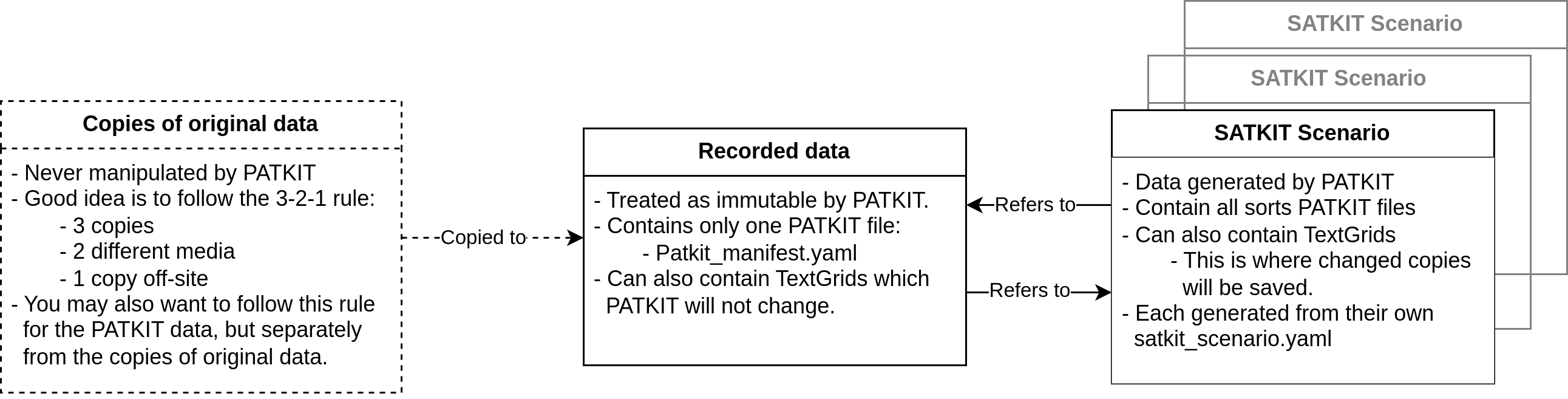
The only files PATKIT will write into or modify in the recorded data
directories is the patkit_manifest.yaml file. It is a PATKIT generated list
of all of the scenarios PATKIT has from this set of recorded data and saved
elsewhere.
Finally, PATKIT Scenarios are different data runs specified each in their own
patkit_data.yaml files. These files list which derived data should be
generated and which parameters to use in the generation. To save time and
resources, PATKIT will check the scenarios listed in patkit_manifest.yaml
files to see if the required data already exists before running the generation
code. If the data exists, then instead of re-generating it PATKIT will just
make a local copy of it in the Scenario directory.
Copies of original and derived data
A good guide to follow for copies of the original data is the 3-2-1 rule. This means keeping at least 3 copies, on at least 2 different media (e.g. SSD and cloud), and 1 copy off-site (in cloud, in another building, or similar). This protects against data corruption, and against fire and flooding.
Like mentioned above, the original copies (the 3-2-1 copies) should not be used as working copies, but rather that will be another copy of the data. They should be made as needed and deleted when no longer needed. When the derived data becomes important in its own right, it will make sense to apply the 3-2-1 rule also to the derived data. This might be the case for example when a publication is based on derived data.
It is good practice to maintain some sort of note on which scenario, which data
point etc. is the basis of any particular analysis. PATKIT provides support for
this mind set by writing a metadata .txt file for each image or other file
exported from PATKIT. It is a good idea to keep these metadata files with the
exported data and images so that when later returning to an old analysis it is
easier to figure out for example which frame of which video this example image
actually is.
Recommended directory structures
With current data structures
At time of writing (Patkit v0.22.3), there is just one recommended directory structure: each Session in its own directory with all recorded files in that same directory.
As new functionality is implemented this will change and more complex considerations will become relevant. The next section details how to organise data once we can process multiple recording session and multiple datasources.
After data structure update
This section outlines directory structures that will make work easier when dealing with multiple recording sessions and datasources in the future. The necessary data structure updates are scheduled in a future version after the release of Patkit v1.0.
The directory structure of recorded data should reflect the hierarchy of acquisition. Keep all files of a given recording session from the same data source (e.g. AAA or RASL or any kind of audio recording) in the same directory or in the subdirectories of one directory divided by file type. Different data sources should have their own subdirectories under a session directory. And session directories of the same experiment series should be gathered in one directory. This is illustrated below and corresponds to the future core data structure hierarchy of Dataset-Session-Source-Trial-Modality.
dataset
├── patkit_manifest.yaml
├── session_dir_1
├── session_dir_2
├── ...
└── session_dir_n
    ├── patkit_manifest.yaml
    ├── source_dir_1
    ├── source_dir_2
    ├── ...
    └── source_dir_n
        ├── patkit_manifest.yaml
        ├── trial_1.param
        ├── trial_1.txt
        ├── trial_1.ult
        ├── trial_1.wav
        ├── trial_2.param
        ├── trial_2.txt
        ├── trial_2.ult
        ├── trial_2.wav
        ├── ...
        ├── trial_n.param
        ├── trial_n.txt
        ├── trial_n.ult
        └── trial_n.wav
In the above example dataset directory contains session directories which contain source directories and an expanded AAA ultrasound source directory is shown as an example. While it might be tempting, participants do not get their own directory level in this scheme. Instead they are inferred from the metadata. Also, it might feel more natural to have each trial have their own directory with files from all sources in that directory - or even in subdirectories - but this would mean an awful lot of copying files around and runs the risk of accidentally overwriting similarly named files with each other.
If there is only one data source it is natural to omit the source directory level from the structure. This is illustrated below. PATKIT will still have a Source object in each Session to make data structure management simpler.
dataset
├── patkit_manifest.yaml
├── session_dir_1
├── session_dir_2
├── ...
└── session_dir_n
    ├── patkit_manifest.yaml
    ├── trial_1.param
    ├── trial_1.txt
    ├── trial_1.ult
    ├── trial_1.wav
    ├── trial_2.param
    ├── trial_2.txt
    ├── trial_2.ult
    ├── trial_2.wav
    ├── ...
    ├── trial_n.param
    ├── trial_n.txt
    ├── trial_n.ult
    └── trial_n.wav
It is important to note that PATKIT will place a patkit_manifest.yaml on each
level of the hierarchy. This is so that if a Scenario only uses one source from
a single session, only that directory gets a note that there is some derived
data available.
For the PATKIT Scenarios it’s possible to use either a flat structure or a full directory hierarchy. The former works only if the Scenario only consists of a single Session. The latter can be used also for a single Session and is essentially necessary for more complex cases to avoid file name conflicts (having for example to files called File001.PD_l1.meta in the same directory - which of course won’t work). These are illustrated below.
dataset
├── patkit_manifest.yaml
├── session_dir_1
├── session_dir_2
├── ...
└── session_dir_n
    ├── patkit_manifest.yaml
    ├── source_dir_1
    ├── source_dir_2
    ├── ...
    └── source_dir_n
        ├── patkit_manifest.yaml
        ├── trial_1.param
        ├── trial_1.txt
        ├── trial_1.ult
        ├── trial_1.wav
        ├── trial_2.param
        ├── trial_2.txt
        ├── trial_2.ult
        ├── trial_2.wav
        ├── ...
        ├── trial_n.param
        ├── trial_n.txt
        ├── trial_n.ult
        └── trial_n.wav
Example data sets
Simple examples of the above cases will be provided eventually as a separate download. If you have a suitable dataset that could be used as an example and the ethical conditions permit it being shared publicly, please get in touch.